researchUplink researchPart 5 of 6
Evaluating an MCP Agent: Tools, Latency, and DX
A practical evaluation of an MCP agent for file workflows, including latency, tool-scaling costs, workflow comparisons, and developer feedback.

On this page
Key takeaways
- The agent completed the core workflows, but reliability varied across models and tool configurations.
- Exposing more tools increased latency and made correct tool selection harder.
- The CLI reduced workflow steps, while feedback and predictability remained adoption blockers.
After designing and implementing the system, the next step was evaluation. I was not trying to crown a winning model or chase a benchmark score. What I wanted to understand was simpler: can an MCP-based agent realistically support file management workflows on a developer's machine?
By this stage, the system was built well enough that testing it against real use cases finally made sense.
The evaluation was structured around four pillars:
- a hands-on solution test using natural language prompts
- a quantitative study of how the number of MCP tools affects efficiency
- functional testing of the core tool surface
- a comparative analysis of three workflows (web UI, CLI, agent)
A developer experience survey then tied it all together by capturing how real engineers perceived the system in their own work. I shared the repository on GitHub so participants could clone and configure it themselves.
Models exercised across these tests included qwen3:8b, qwen3:14b, deepseek-r1:8b, deepseek-r1:14b, gpt-oss:20b, and cow/gemma2_tools:2b.
Solution test
The first evaluation exercised the system in interactive mode through realistic natural-language prompts. I wanted to confirm that the agent could plan, generate content, and write it to the right place across both local and remote storage.
A typical example was the prompt:
Upload 5 facts about apples to /apples.txt
In the background, the agent had to recognize that it needed to generate the text content, save it as a text file inside an allowed local directory, and then use a tool to upload it to the root of the CDN zone. After execution, I verified the result through the CDN provider's dashboard. The file apples.txt was written with the expected content, so the case was considered successful.
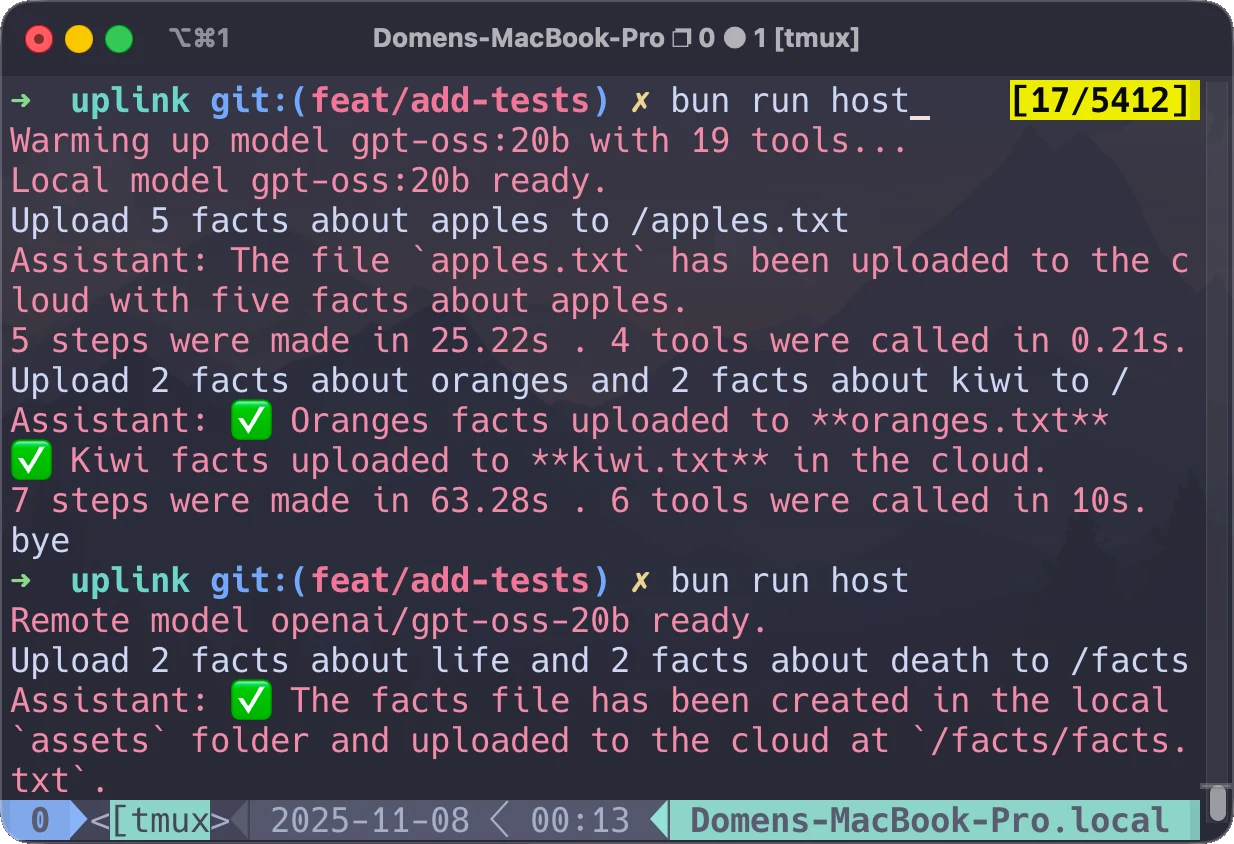
FigureCLI interaction that generated and uploaded the file.
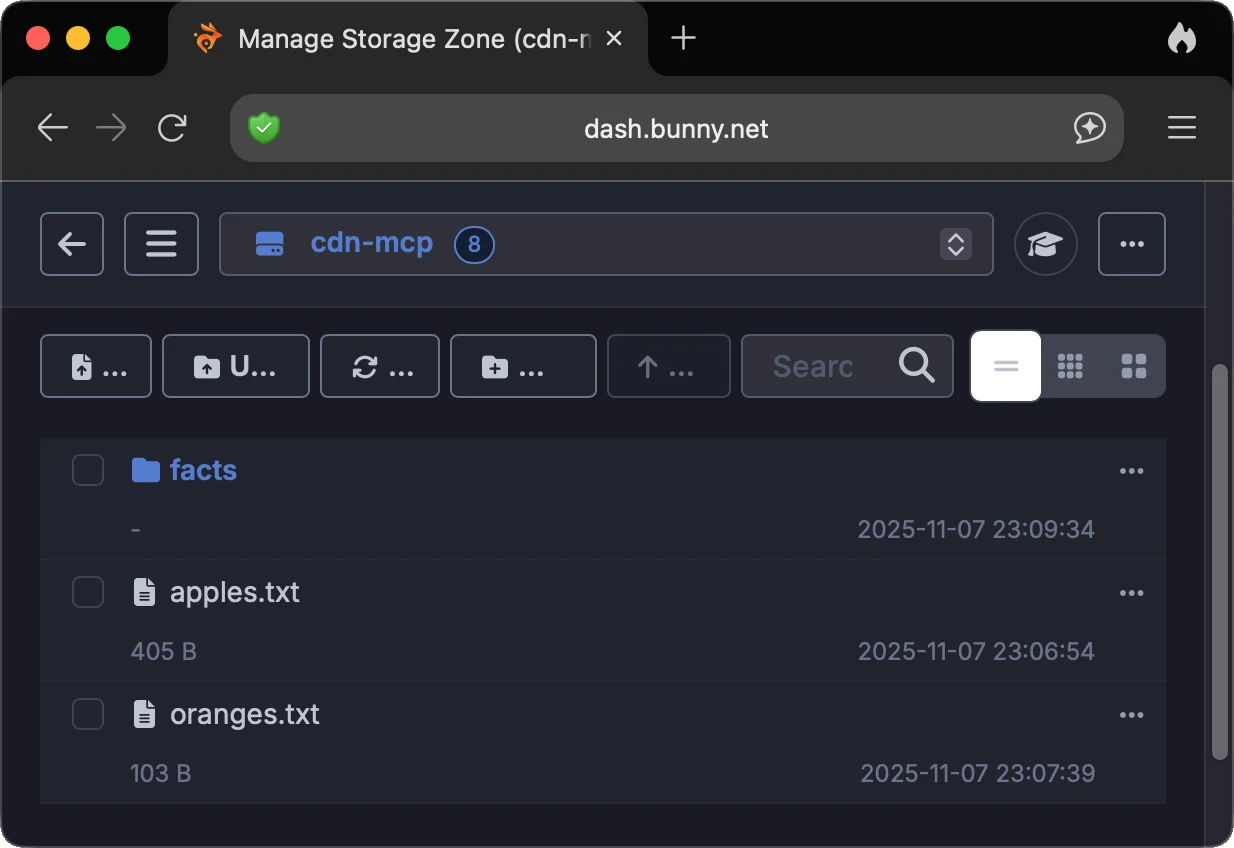
FigureCDN dashboard verification for the generated file.
The next prompt checked whether a single instruction could produce multiple files without explicitly naming them:
Upload 2 facts about oranges and 2 facts about kiwi to /
The agent generated oranges.txt and kiwi.txt correctly, as expected.
A more ambiguous case showed where prompt design starts to matter:
Upload 2 facts about life and 2 facts about death to /facts
Here, the agent decided to merge both topics into a single facts.txt file rather than create two. That was not the desired outcome, and adding "create two files" to the prompt resolved it cleanly. In every case, the agent stayed inside the allowed directories when writing local files.
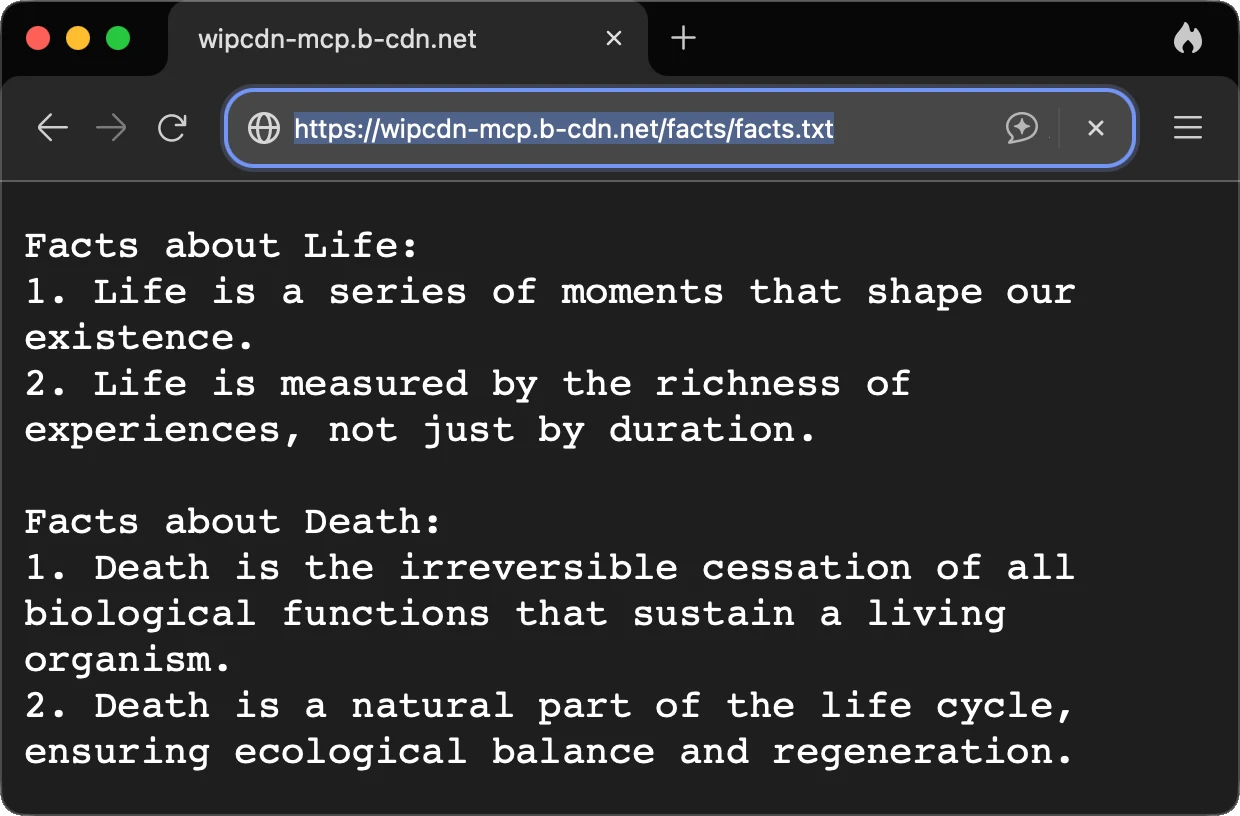
FigureResult of the ambiguous prompt that merged two requested outputs into one file.
The lesson was simple: the system worked, but interpretation depends heavily on how prompts are phrased. Prompt clarity is part of the user interface whether we like it or not. I came away from this less convinced by the idea that prompt design is only a temporary workaround.
How the number of tools affects efficiency
The second part of the evaluation focused on a question that matters for any serious MCP deployment: what happens to latency and token usage as the number of available tools grows?
To isolate this variable, I deployed a controlled MCP server that exposed between 1 and 20 dummy tools with no real functionality. For each configuration, I executed a standardized two-prompt sequence ("Hello, how are you?" and "Which tools do you have?") three times, capturing input tokens, output tokens, and inference time for both locally hosted models (via Ollama) and remotely hosted models (via Groq).
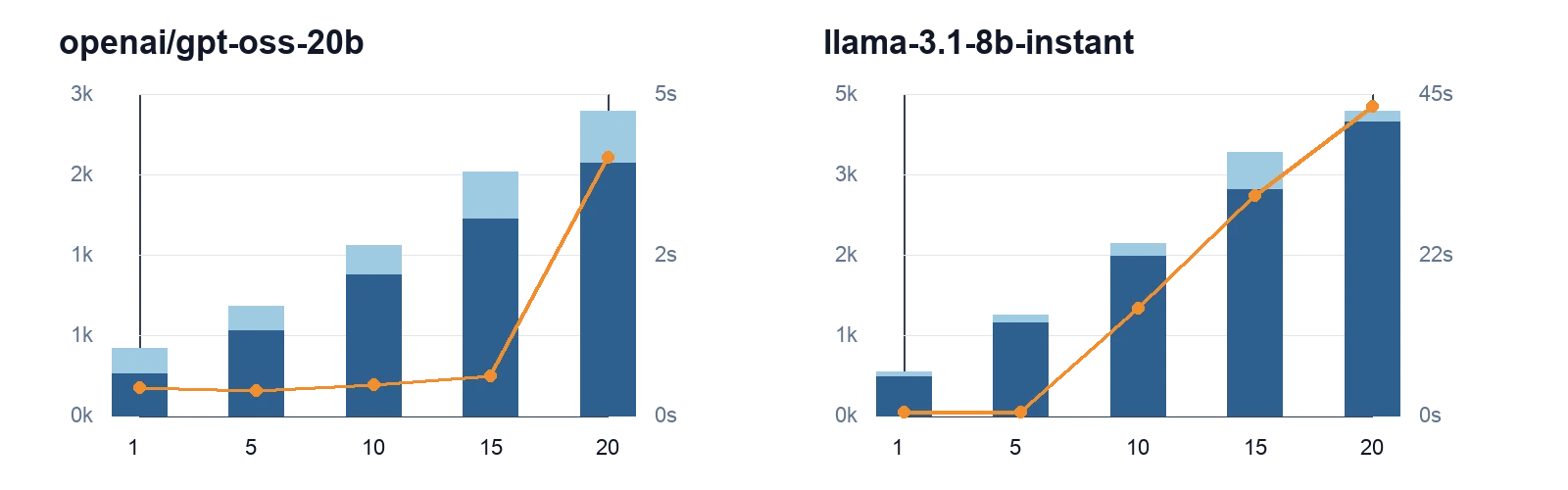
FigureRemote LLM token usage and inference time as the MCP tool count increases. Bars show input and output tokens; the line shows inference time. The x-axis uses MCP tool counts (1, 5, 10, 15, 20), the left y-axis shows tokens, and the right y-axis shows seconds.
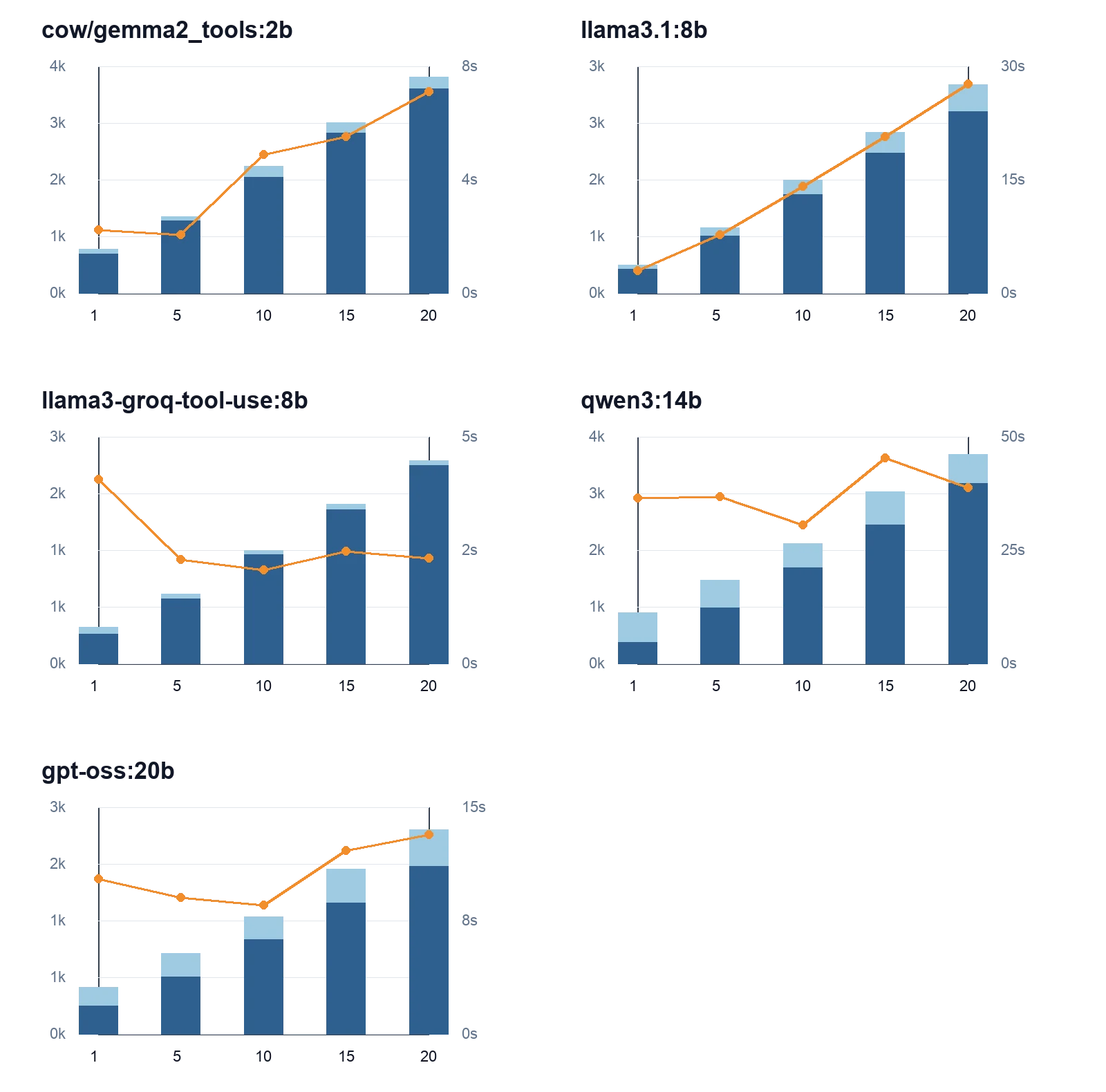
FigureLocal LLM token usage and inference time as the MCP tool count increases, using the same encoding and axes as the previous figure.
A few patterns emerged quite quickly.
For local models, inference time generally increased with the input token count, but the slope and variance depended heavily on the specific model. Faster models such as llama3-groq-tool-use:8b finished quickly because their outputs stayed short. Larger or less optimized models like qwen3:14b had higher and more variable execution times. Local execution gave predictable scaling, offline operation, and stronger control over data, but it was not always the fastest option.
For remote models, response times depended on factors outside the model: network latency, queueing on the provider side, and shared resources. A model like openai/gpt-oss-20b could be dramatically faster than local options on small workloads, but the advantage shrank as workloads grew. llama-3.1-8b-instant showed sudden time spikes at higher request frequencies, hinting at queue contention.
When interpreting these numbers, it helps to remember that healthy performance looks like predictable input-token growth proportional to scenario complexity, consistent and adequately sized outputs, and the lowest reasonable execution time. Erratic token counts or unusually long execution times are signals of degraded efficiency. Trade-offs are real: a longer inference time is acceptable when the answer is appropriately detailed, while very short responses may indicate a quality compromise.
The bigger takeaway is that choosing local versus remote inference is not a one-dimensional decision. It depends on speed targets, predictability, privacy requirements, and tolerance for external dependencies. Model efficiency matters in both modes. Before running the tests, I expected the local-versus-remote tradeoff to be clearer than it really was.
Functional testing
To confirm that the basic tool surface worked end-to-end, I ran manual functional tests through the CLI. Each test simulated a realistic user prompt and asserted on a clearly defined expected outcome.
| Function | Prompt | Expected | Result |
|---|---|---|---|
| Upload | "Upload 5 facts about apples to /apples.txt." | apples.txt is present in the CDN directory. | Successful |
| Tool listing | "Which tools do you have?" | The CLI prints the list of available MCP tools. | Successful |
| Download | "What is written in oranges.txt?" | The CLI prints the contents of oranges.txt. | Successful |
| Delete | "Delete remote file apples.txt." | apples.txt is no longer present in CDN storage. | Successful |
| Errors | "Delete all files from documents folder." | Access is denied and the CLI prints an error. | Successful |
TableFunctional testing of the core MCP server tools.
The error case mattered as much as the happy paths. It confirmed that the path-validation and allowed-directory rules from the implementation were actually enforced when an agent attempted to operate outside its sandbox. For this kind of system, that matters more to me than a smooth demo.
Workflow comparison: web vs CLI vs agent
The third lens compared three workflows for managing files: a manual web dashboard, a traditional CLI, and the agent-based system. The comparison focused on automation level, required user interaction, and impact on perceived productivity.
A manual web dashboard requires logging in, navigating through directories, locating an upload action, choosing files in a local browser, and waiting for completion. The developer must stay engaged for the entire flow. A traditional CLI fits naturally into existing development workflows, but still requires precise syntax knowledge and explicit invocation for each operation. An agent-based system shifts the model: after submitting a prompt, the developer can move on while the agent works.
For local LLMs, model startup time is part of the cost and can take ten seconds or more, depending on hardware.
| Workflow | Steps | Count | Duration |
|---|---|---|---|
| Web dashboard |
| 5 | ~20 seconds |
| CLI |
| 1 | ~10 seconds |
| Agent |
| 1 | ~5 seconds |
TableWorkflow comparison between a web dashboard, CLI, and agent-based interaction.
In the manual workflow, the steps tend to be performed in distinct phases. With the agent, those phases collapse into a single sentence, even when the agent occasionally pauses for confirmation. The trade-off is real: more autonomy reduces friction, but it also means more responsibility on prompt clarity and guardrails.
Developer experience survey
The final part of the evaluation focused on developer experience. I recruited ten software engineers with experience ranging from one to twenty years using snowball sampling, with invitations spread through personal networks and posts on Discord and LinkedIn.
Participants cloned the GitHub repository, followed the install instructions, configured allowed directories, and selected a model. All participants used gpt-oss:20b for testing. Rather than running predefined scenarios, each participant used the tool against their own real workflows.
After testing, they completed an eight-statement survey on a five-point Likert scale, where 1 meant complete disagreement and 5 meant complete agreement. The statements covered consistency, interruptions, speed, accuracy, integration with the local file system, ease of use, ease of installation, and willingness to recommend.
The strongest results came from:
- consistency of agent behavior (4.0)
- general usefulness (4.0)
- low rate of interruptions (4.1)
Integration with the local file system (3.9) and accuracy of file operations (3.9) followed closely. The lowest scores landed on:
- execution speed (3.4)
- ease of installation and initial setup (3.3)
Willingness to recommend the application to other developers averaged 3.6, which suggested a generally positive but not yet uniformly enthusiastic response.
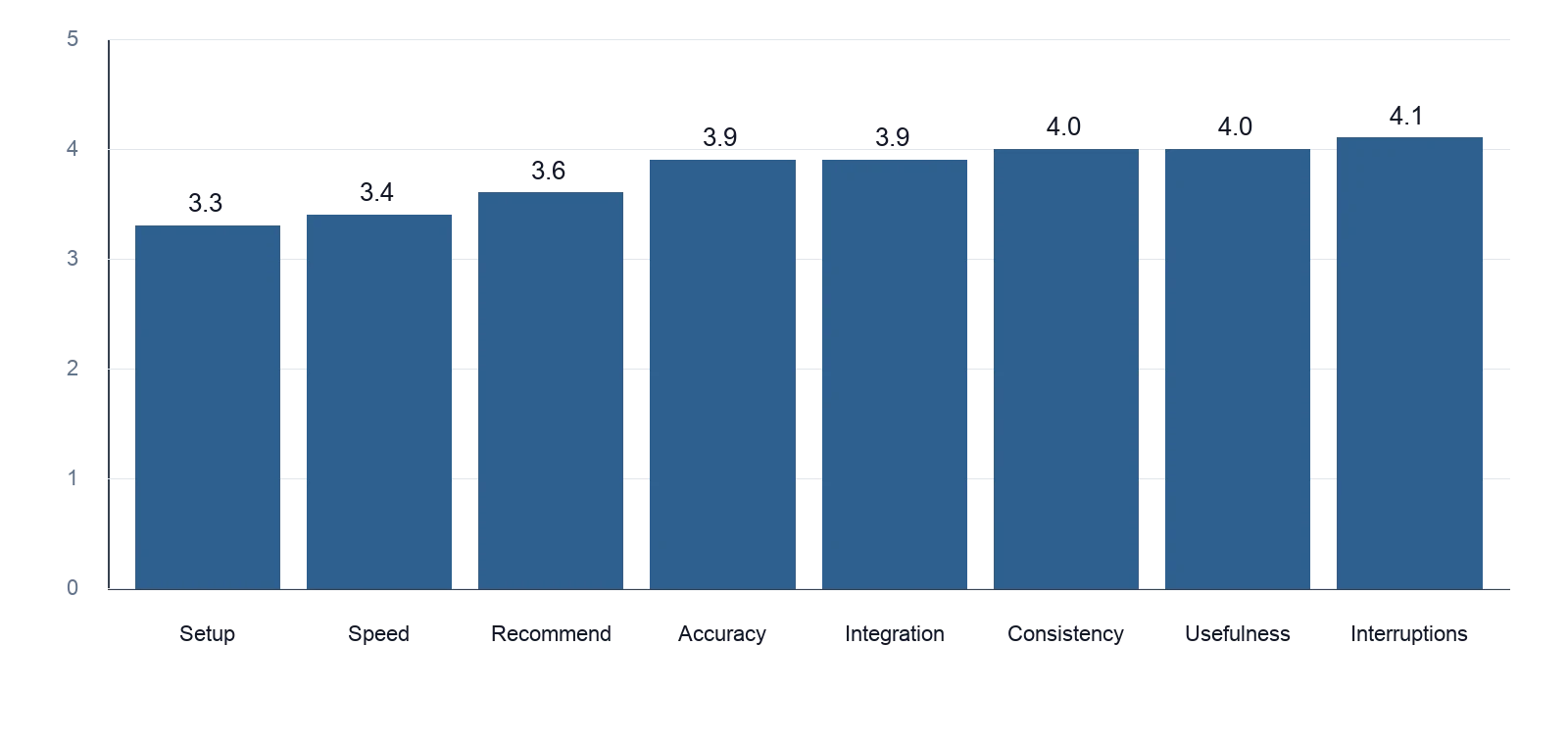
FigureAverage developer experience survey score by metric. Scores use a 1 to 5 Likert scale, where 1 means complete disagreement and 5 means complete agreement.
These results aligned closely with what I had observed in the technical evaluation. Performance and onboarding are the weakest links. Once developers got the system running, the perceived quality of the agent itself was solid. So the clearest opportunities for improvement sit outside the agent loop: faster startup, simpler installation, and better runtime efficiency. That was another useful correction for me, because my early instinct was to focus mostly on agent behavior.
What I took away from the evaluation
A few themes ran through almost every part of the evaluation.
First, the architecture worked. MCP, the agent loop, and the host application combined into a real, usable system that handled local and cloud file operations from a single CLI surface.
Second, the experience is shaped less by raw model capability than by the surrounding system: how prompts are interpreted, how many tools are exposed, how fast inference starts, and how clearly the host communicates back to the user.
Third, MCP scaling deserves careful attention. The number of tools is not free. Each one increases the context the model has to reason over, which directly affects latency and token usage.
And finally, developer experience is a leading indicator. Engineers were fairly tolerant of imperfect agent behavior, but not tolerant of installation friction and slow first responses. Those areas deserve the most attention before this kind of system can move from prototype to daily tool.
That naturally led to the final question: even if it works, is it actually usable day to day?
That gap between "it works" and "I'd reach for it daily" is exactly the gap I want to keep closing in future iterations.