researchUplink researchPart 4 of 6
Uplink: A Modular MCP-Powered CLI for File Operations
How I built a modular MCP-powered CLI for file operations with local and remote agents, tool orchestration, guardrails, and extensible architecture.
On this page
Key takeaways
- Separate MCP servers keep local and cloud file operations reusable while agents remain replaceable.
- Filesystem constraints must be enforced below the model layer, not left to prompt instructions.
- One host supports both interactive chat and focused one-shot file workflows.
Uplink is a research project focused on building a modular, agent-driven CLI for working with both local and remote files through the Model Context Protocol (MCP). The system combines MCP servers, local and remote LLM agents, and a host application that coordinates tool usage, planning, and execution.
This is the part where the project moved from research notes into an actual system.
I was not trying to compare language models or optimize benchmark performance. The research focused more on technical feasibility:
- can MCP provide a clean modular boundary for agentic file operations,
- can the same host application support both local and remote models,
- and can this be done in a way that remains practical, extensible, and reasonably safe?
A major constraint throughout the work was accessibility. I intentionally prioritized solutions that could be tested for free, including local inference with Ollama and remote inference through Groq. That constraint shaped more of the architecture than I expected at the beginning.
Why I built it
I was interested in a practical intersection of:
- agentic systems,
- developer tooling,
- CLI workflows,
- modular architecture,
- and safe interaction with file systems.
There are many examples of chat interfaces and basic assistants, but far fewer concrete examples of MCP-based systems that coordinate real tool use across local and cloud storage. Existing material was limited, so a lot of the architecture emerged through experimentation: trying different structures, testing failure modes, and adjusting abstractions as the system evolved.
Uplink became my way to explore how an AI agent can move beyond text generation into structured task execution, while still keeping the implementation understandable enough to extend and debug.
Core requirements
The system was designed around a few practical requirements.
Functional requirements
- Support both interactive chat mode and one-shot execution mode.
- Allow file upload, download, delete, and update operations across local and cloud storage.
- Interpret natural language requests, create a plan, execute it, and verify progress.
- Support both local models and remote LLM providers depending on the user’s hardware and preferences.
Non-functional requirements
- Stable and correct execution of basic operations.
- Constrained access to the local file system.
- Clear error reporting without crashing on invalid input.
- Logging of critical actions and failures for debugging and analysis.
High-level architecture
In practical terms, Uplink consists of five main parts:
-
Cloud file MCP server A custom MCP server for remote file operations. In this research, I used bunny.net CDN as the cloud storage target.
-
Local filesystem MCP server The existing
@modelcontextprotocol/server-filesystemserver for local file access. -
Local agent A custom agent implementation that works with local models served through Ollama.
-
Remote agent A custom agent implementation that uses Vercel AI SDK to connect to remote LLM providers.
-
Host application A CLI application that loads configuration, initializes the selected agent, provides system instructions, and runs the interaction loop.
This architecture mattered because MCP created a strong modular boundary. Instead of hard-coding tools directly inside one application, file capabilities could be exposed through MCP servers and reused independently.
Why MCP over direct tool integration
During the research, I compared three architectural directions:
- a basic assistant without LLMs,
- an LLM application with tools tightly coupled to the project,
- an LLM application with MCP-based tool servers.
The third option was the most compelling to me. It adds some complexity, but it also makes tools reusable across projects and clients. That modularity was the main architectural advantage, and in the end I think it was worth the extra moving parts.
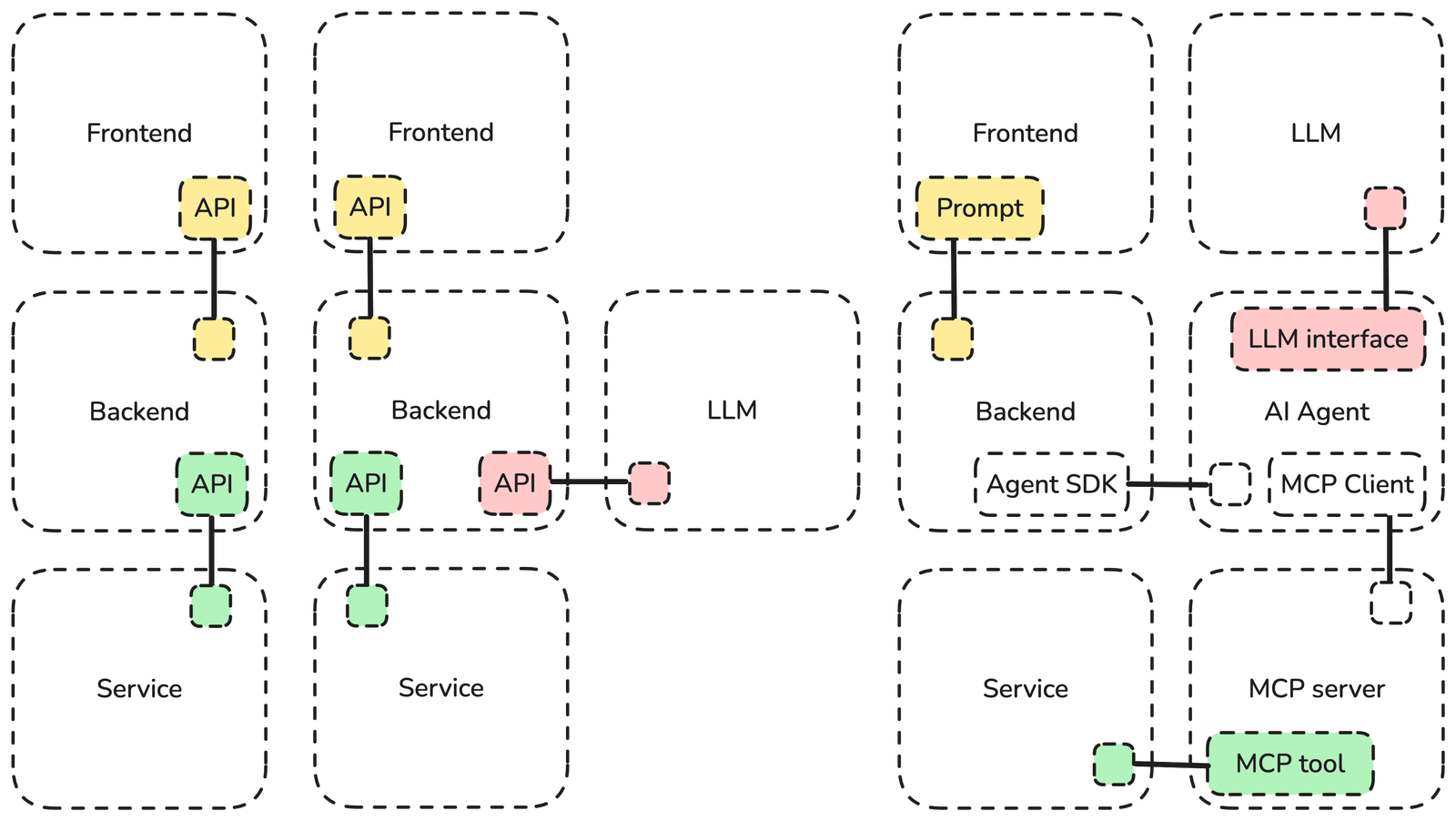
FigureThree architecture options compared during the system design.
In practice, this meant I could:
- develop a dedicated MCP server for cloud file operations,
- reuse the existing filesystem server for local operations,
- swap agents or model providers without rewriting the tool layer.
Implementation overview
I implemented the application as a CLI-first system, optimized for developer workflows rather than a graphical UI.
Key source files included:
uplink-server.ts— the main MCP server for cloud file operationsclient.ts— MCP client logic and tool invocationlocal-agent.ts— local agent with Ollama-backed modelsremote-agent.ts— remote agent using Vercel AI SDKhost.ts— application entry point and conversation loopmcp-config.json— runtime configuration for servers, agents, and modelslib/*— shared utilities such as logging
The host reads configuration, creates the appropriate agent, connects to configured MCP servers, and then either:
- starts a chat loop, or
- processes a single prompt and exits.
This made the system usable both as an interactive assistant and as a task-oriented CLI tool.
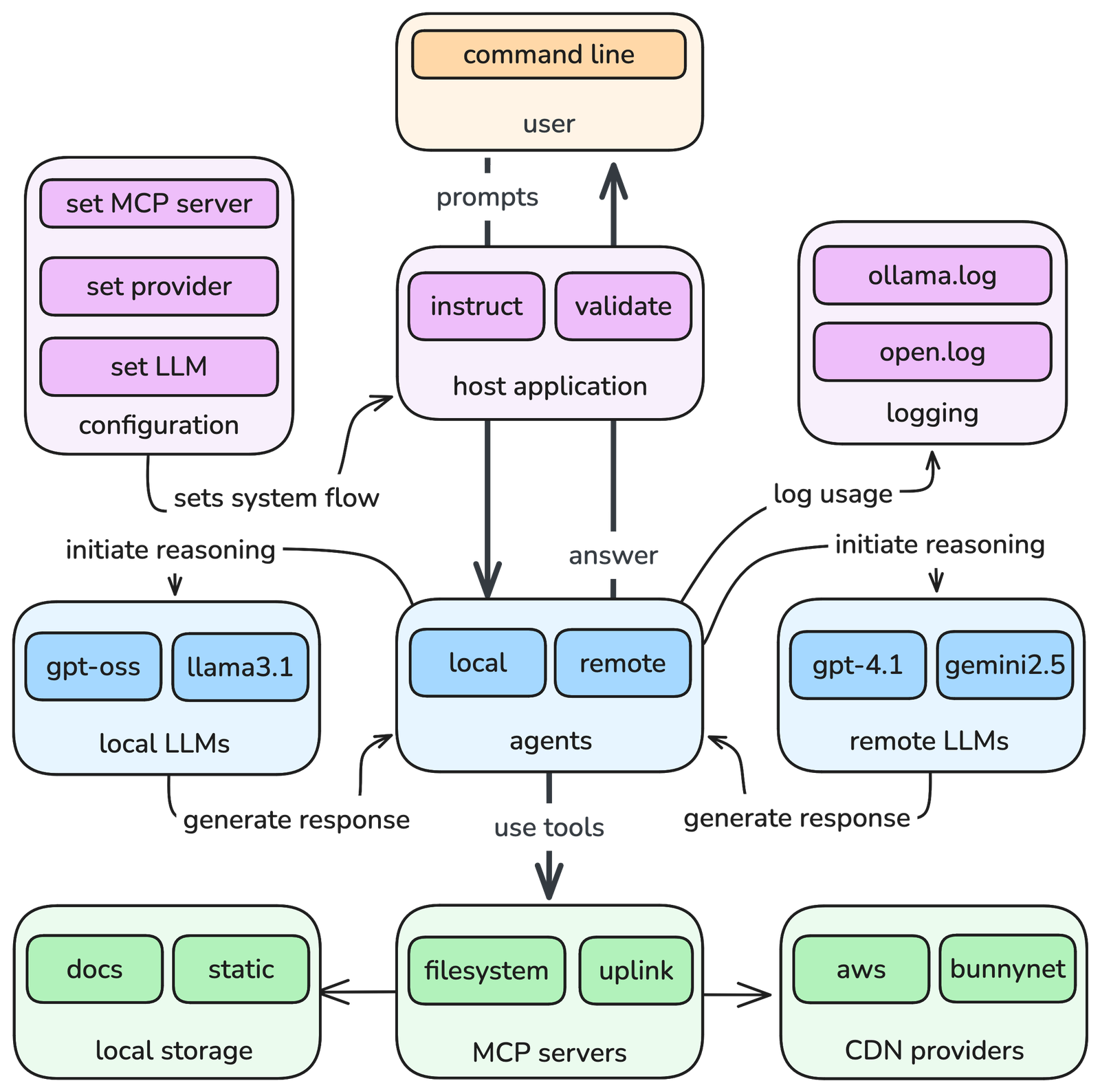
FigurePrompt-processing flow through the host application, agents, LLMs, MCP servers, and CDN providers.
The cloud MCP server
One major part of the work was implementing a custom MCP server for cloud file operations on bunny.net CDN.
It exposed tools for:
- listing files,
- uploading files,
- downloading files,
- deleting files.
Before registering these tools with MCP, I first tested the underlying bunny.net SDK operations directly with standalone scripts. Only once the lower-level file operations were verified did I wrap them as MCP tools.
server.registerTool(
  "uplink_list_files",
  {
    title: "List files",
    description: "The tool will list all files in the storage zone.",
    inputSchema: { /* ... */ },
  },
  async ({ remotePath }) => {
    try {
      const files = await api.list(remotePath);
      return {
        content: [{ type: "text", text: JSON.stringify(files) }],
      };
    } catch (error) {
      /* ... */
    }
  },
);
FigureRegistration of the uplink_list_files tool for listing CDN directory contents.
I also used MCP Inspector to validate the server behavior, inspect registered tools, and test request/response structures. That was especially useful for checking whether tool descriptions, arguments, and output schemas actually matched the implementation.
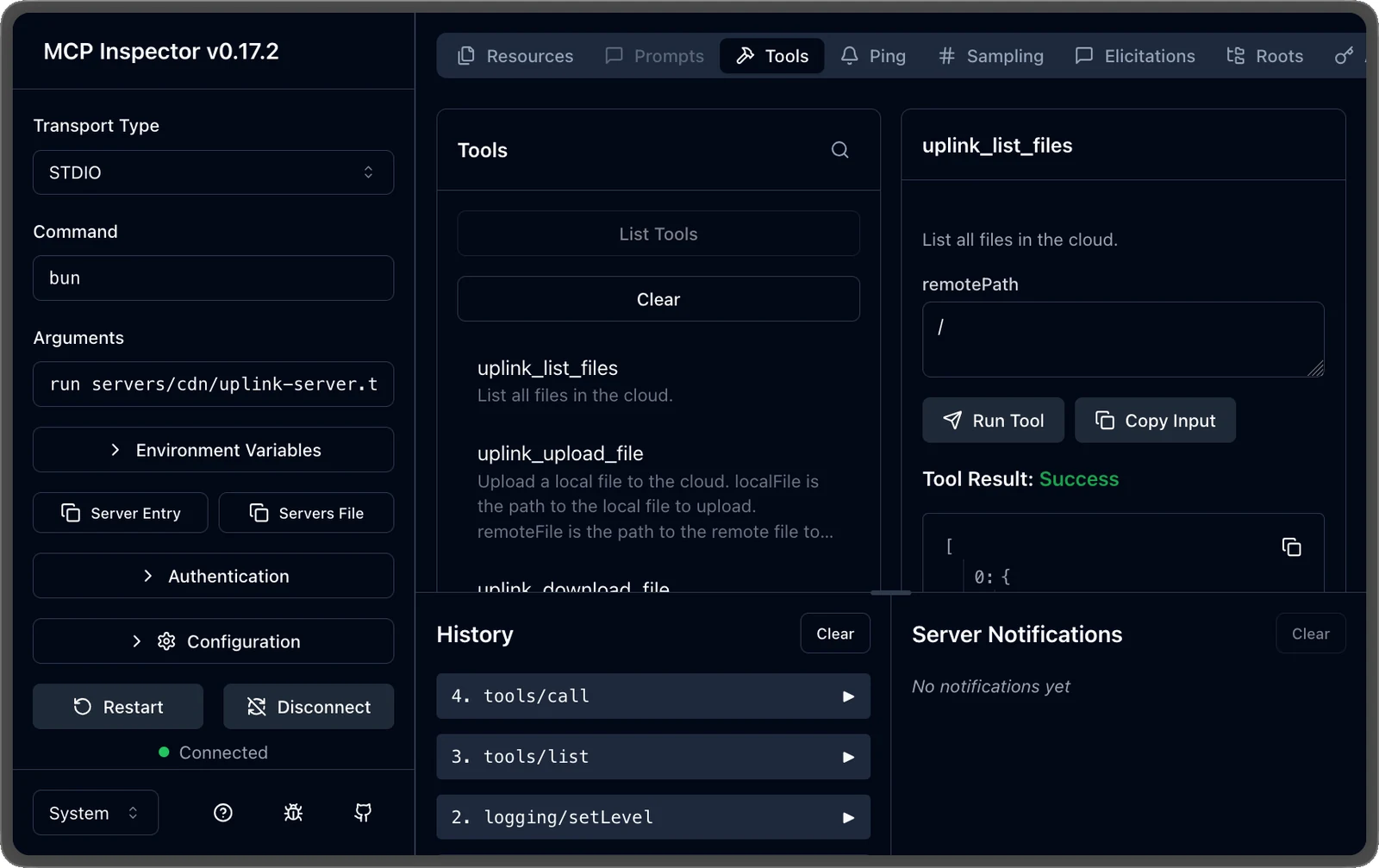
FigureMCP Inspector UI used to test the Uplink server connection and tool behavior.
Security lessons: path validation matters
One of the most important findings came from an early implementation mistake.
The first version of the uplink_download_file tool used Bun.write with a localFile parameter that was not properly validated. In practice, that meant a model could potentially write to arbitrary locations on the local file system if it generated a malicious or incorrect path.
That exposed a critical safety issue. It was also the moment when the project stopped feeling like a clean architecture exercise and started feeling like a real agent system with real failure modes.
To address this, I introduced allowedDirectories in mcp-config.json and updated the server so all local path access had to be validated against explicitly allowed directories. If a path failed validation, the server returned a structured Path not allowed error.
"uplink": {
  "command": "bun",
  "args": ["run", "servers/cdn/uplink-server.ts", "/uploads"]
}
FigureAllowed-directory configuration used to constrain local file writes.
This was one of the clearest examples of why agentic systems need defense in depth:
- tool-level validation,
- server-level constraints,
- agent-level filtering where needed.
Prompt instructions alone are not enough.
The filesystem MCP server
For local file operations, I used @modelcontextprotocol/server-filesystem.
This server already includes path validation logic designed to keep access within approved directories, including protections around symbolic links. It exposed tools such as:
write_fileread_fileedit_filelist_allowed_directories
While testing it inside Cursor, I ran into intermittent errors that were difficult to trace because they were not always surfaced clearly. That highlighted another practical challenge with these systems: even when the protocol abstraction is clean, the surrounding host environment can still introduce noisy or opaque failure modes.
{
  "jsonrpc": "2.0",
  "id": 1,
  "method": "tools/call",
  "params": {
    "name": "uplink_list_files",
    "arguments": {
      "remotePath": "/"
    }
  }
}
FigureJSON-RPC request used to call uplink_list_files.
{
  "jsonrpc": "2.0",
  "id": 1,
  "result": {
    "content": [
      {
        "type": "text",
        "text": "[{\"name\":\"index.html\",\"size\":1024}]"
      }
    ]
  }
}
FigureJSON-RPC response returned by uplink_list_files.
Agent design
The system includes two separate agent implementations.
Local agent
The local agent uses Ollama-hosted models and keeps inference on the machine. That improves privacy and allows experimentation without relying on external APIs.
Remote agent
The remote agent uses Vercel AI SDK and supports remote providers. For this work, I focused on Groq because free access was an explicit requirement.
The point was not provider comparison. Since Vercel AI SDK makes provider swapping relatively straightforward, the more interesting question for me was whether the abstraction itself worked cleanly inside the system design.
Agent loop
Both agents share the same core idea:
- maintain message history,
- send the current context to the model,
- detect requested tool calls,
- execute those tools through MCP clients,
- append tool results back into context,
- repeat until no more tool calls are requested.
I implemented this as an iterative loop rather than a recursive one. For this domain, iterative control felt simpler and easier to inspect. After each tool call, the agent updates context and tries again with the new state.
That gave the system a lightweight planning-execution-observation cycle without adding a more elaborate planner architecture.
BEGIN
  msgs.push({role: "user", content: prompt})
  tool_calls = []

  REPEAT
    resp = model.createMessage(msgs, tools)
    msgs.push(resp.message)
    tool_calls = resp.message.tool_calls

    FOR tool IN tool_calls
      TRY
        res = executeTool(tool)
        msgs.push({role: "tool", content: res})
      CATCH err
        HANDLE error with retry or termination
      END
    END
  UNTIL tools_calls IS EMPTY

  RETURN msgs[last].content
END
FigureMain agent loop with LLM reasoning, tool execution, and context updates.
Models tested
For local experimentation, I tested models such as:
qwen3:0.6bllama3.1:8bgpt-oss:20bllama3-groq-tool-use:8bcow/gemma2_tools:2bphi3:3.8bgemma:2b
For remote usage, I tested models including:
gpt-ossllama3:70bllama3:8bmixtral:32b
The purpose was not exhaustive evaluation, but flexibility. I wanted the architecture to work across different model sizes, speeds, and tool-calling behaviors.
Hardware used for local inference
The initial local implementation ran on:
- Apple MacBook Pro
- Apple M1 Pro
- 32 GB RAM
- 1 TB SSD
- macOS 26.1
This setup was sufficient for local experimentation with models up to roughly 20 billion parameters, depending on the specific model and runtime constraints.
Host application and CLI workflow
The host application was designed as a CLI because that best matched the intended user: developers already comfortable with terminal workflows.
The runtime behavior is simple:
- load
mcp-config.json - initialize the selected agent
- connect to MCP servers
- start chat mode or run a single prompt
- print the final response
- keep running unless explicitly exited
{
  "mcpServers": {
    "filesystem": {
      "command": "bunx",
      "args": ["mcp-server-filesystem", "assets", "downloads"]
    },
    "uplink": {
      "command": "bun",
      "args": ["run", "servers/cdn/uplink-server.ts"]
    }
  },
  "ollama": {
    "host": "http://localhost:11434",
    "modelId": "gpt-oss"
  },
  "openai": {
    "host": "https://todo.dev",
    "modelId": "gpt-5"
  },
  "agentProvider": "ollama",
  "isChatEnabled": true
}
Figuremcp-config.json configuration for servers, agents, models, and chat mode.
This made the system useful in two modes:
- as an interactive agent for exploratory workflows,
- as a one-shot command-line tool for scripted or isolated tasks.
That second mode turned out to be especially useful for testing and performance analysis.
BEGIN
  TRY
    FOR line IN input
      IF line = "bye" THEN EXIT
      res = await agent.solve(line)
      IF res.error THEN OUTPUT res.error
      IF NOT config.isChatEnabled THEN BREAK
    END FOR
  CATCH err
    OUTPUT err
  END
END
FigureHost application conversation loop.
What the research taught me
A few themes became very clear while I was building and testing it.
1. MCP is a strong abstraction for tool modularity
The protocol made it easier to separate tool capabilities from agent logic. That was the biggest architectural win.
2. Guardrails must exist below the model layer
The path validation issue made this obvious. If a tool can touch the file system, it must enforce hard constraints regardless of what the model tries to do.
3. Tool use is still inconsistent across models
Some models behaved as expected. Others hallucinated tool usage or implied actions they had not actually executed. That inconsistency makes robust automation harder than a simple demo suggests, and it lowered my confidence in “model-first” evaluations quite a bit.
4. Context growth becomes expensive quickly
As the conversation grows, every turn becomes more expensive because the full message history affects inference cost and latency. This reinforces a pattern now seen in modern agent tooling: break work into smaller scoped tasks or sub-agents instead of forcing everything through one long-running context thread.
Current limitations
Uplink is intentionally a research system, and several limitations remain.
- MCP communication can be fragile when implementations write unexpected output to stdout.
- Some models describe tool use without actually performing it.
- Long-running conversations become slower as context accumulates.
- Agent plans are still difficult to verify reliably.
- Tool-using agents remain too unpredictable for critical infrastructure use without stronger guarantees.
- The broader ecosystem still lacks mature, stable standards for agent architecture and verification.
These limitations are not just shortcomings of this system. They reflect broader realities of current agentic tooling.
Why this matters to my work
This research sits at the intersection of areas I care about most:
- modular architecture,
- developer experience,
- AI-assisted workflows,
- practical safety constraints,
- reducing complexity in systems that need to stay adaptable.
Uplink helped me think more concretely about how agentic interfaces should be designed for real use: not as magical automation, but as constrained, inspectable systems built around explicit tools, clear boundaries, and operational feedback. I trust that direction much more than the usual “just give the model more freedom” approach.
That framing continues to shape how I think about AI-native developer tools and Agentic UI systems.
Closing thoughts
Uplink started as an exploration into MCP and tool-using agents, but it became a deeper study of system boundaries.
The most interesting part was not whether an LLM could call a tool. It was how to structure the whole system so that tool use remains modular, observable, and constrained enough to be useful.
That is still the problem I find most compelling in this space.
Once the system was working end to end, I could finally evaluate it properly.
If you are working on MCP, CLI agents, or AI-powered developer workflows, I would be glad to compare notes.